How to Standardize Schedule Views Across Project Teams
In large EPC projects, schedule data is rarely reviewed by a single person.
These projects involve a wide range of stakeholders, including planners, project managers, executives, consultants, and multiple construction teams and each group have their different goals and assignments. Different groups of stakeholders and different roles within one team all need visibility into the same Primavera P6 schedule, but not necessarily in the same level of detail.
This is why standardizing schedule views is becoming increasingly important in modern project controls environments.
Stop wrestling with Primavera XER schedules.
Your team can see your schedule without buying a P6 license.
Start Free Trial No credit card · Windows & Mac · From $344/yr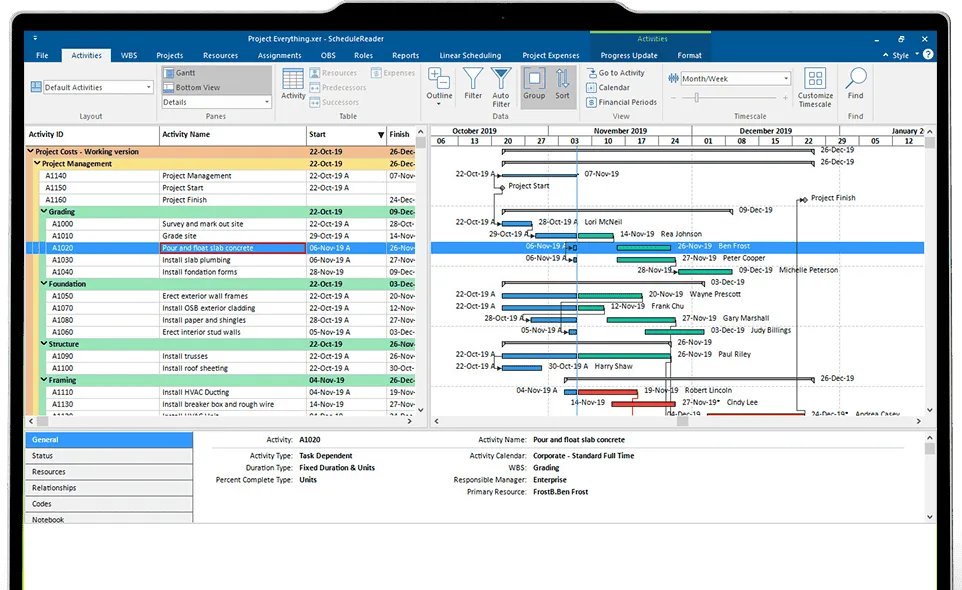
By using layouts in ScheduleReader, organizations can create consistent ways of viewing schedule data across the broader project team and synchronize the work between teams.
Why Tailored Schedule Views Matter
A Primavera P6 schedule contains a massive amount of data. Depending on the size of the project, a single schedule may include thousands or even thousands of activities, multiple calendars, relationships, baselines, resources, and codes and reviewing this data can be difficult for anyone outside the scheduling team.
Schedulers often spend significant time customizing views for different meetings, or exporting simpler PDF copies intended for the execution of day-to-day activities.
For instance, foreman or construction managers may need a look-ahead grouped by work area, while executives only want to see milestone status and critical path movement. Procurement teams may need activity filtering tied to purchase orders or delivery sequences. Although the data comes from the same schedule, the presentation requirements differ greatly.
This is where ScheduleReader comes in.
Layouts in ScheduleReader
Layouts store the complete visual setup used to display schedule data, including activity columns, grouping structures, filters, sorting logic, Gantt chart formatting, timescale settings, colors.
Every action (add/remove fields, insert filters, groups, bar settings, etc.) is automatically saved in the layout, when a user is reviewing a schedule.
This means users can configure highly specific views tailored to particular audiences or workflows and then reuse them at any time without rebuilding the setup manually.
Within ScheduleReader there are default layouts for the activities, WBS, projects, resources and assignments that hold information about the arrangement of the different table elements in the appropriate view. Users can choose to view the information using these layouts or create their custom layouts for each of the different views in the application.
Working with Layouts created in ScheduleReader
A project managers can create a new layout with custom view settings for a specific role in ScheduleReader, export it as .XML file and distribute it with the intended stakeholder group.
The process is straightforward.
Users can easily create a new layout or quickly copy an existing one and modify it. They can rename the layouts at any time and even quickly reset all performed modifications.
Working with Layouts created in Oracle Primavera P6
Layouts created in the Oracle Primavera P6 application and exported as .plf can also be imported into ScheduleReader, upon which the user will have the same view as it was intended for viewing the project file.
Rather than exporting static PDFs every reporting cycle, the scheduler can distribute the Primavera P6 XER file together with predefined layouts that instantly present the data exactly as intended, allowing the user to get into more details quickly and easily.
In this way, repetitive preparation work is significantly reduced, and all stakeholders can review schedule information in a consistent manner.
Improving Collaboration Between Schedulers and Non-Schedulers
Primavera P6 schedules can be technical and hard to understand by team members who are not deeply involved in the planning processes and are not schedulers.
Layouts can help overcome this gap by simplifying how the schedule information is presented. Schedulers or project managers who create the layouts can remove unnecessary technical fields from the view and instead focus on essential elements that the team members can easily interpret.
This improves the quality of project discussions as stakeholders now spend less time trying to understand the schedule structure and more time focusing on actual execution. Furthermore, it helps reduce dependency on the scheduler as users can consistently access the same prepared views independently.
Final Thoughts
As projects become larger and increasingly complex, standardized communication of schedule related information becomes increasingly important.
Layouts in ScheduleReader allow organizations to standardize how schedule data is presented across teams. By distributing these customized views along with schedule files, project teams work from a consistent, standardized view of data intended for their specific role.
Organizations save time, improve communication, and ensure the right schedule information reaches the right people.

The Synami team is the collective voice behind Synami’s project management solutions, providing guidance, tips, and industry expertise to help teams plan, manage, and deliver projects more effectively.