
View Project Data
Learn moreGet a full overview of your Primavera project data through dynamic views.

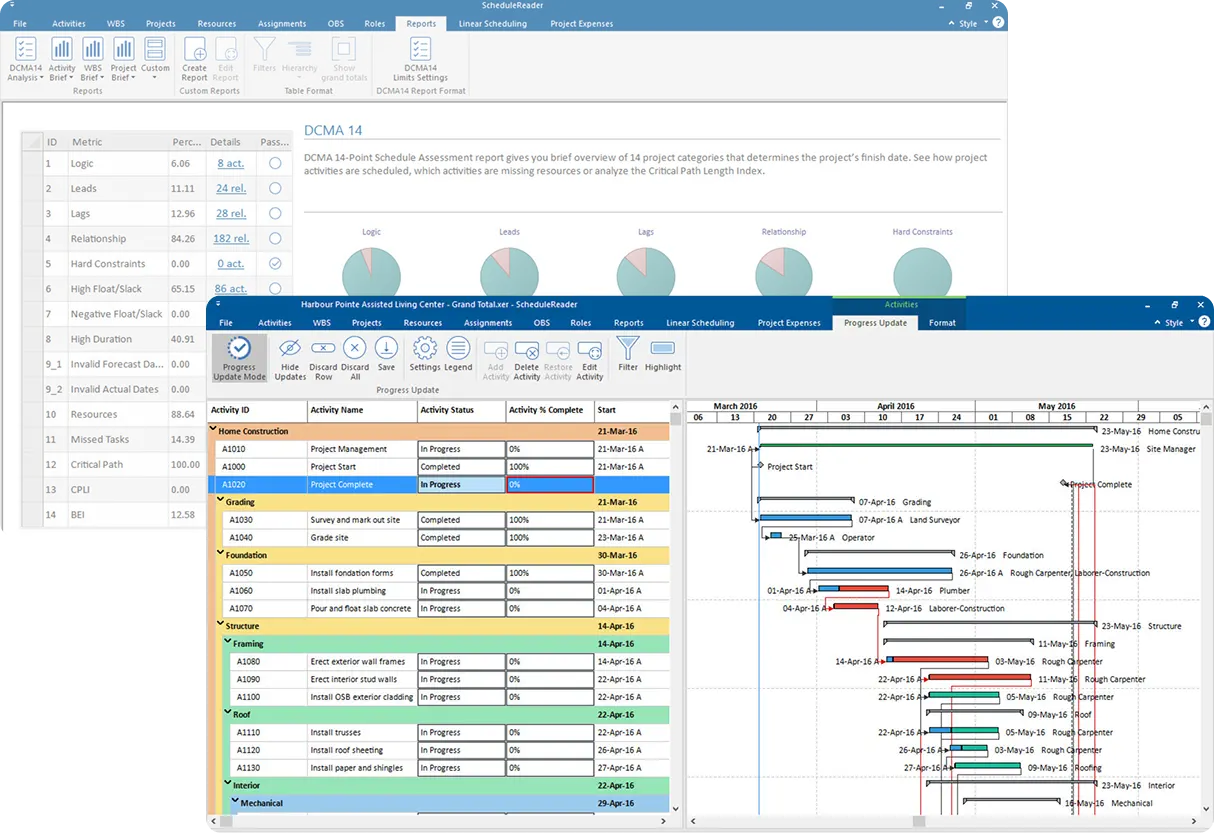
Open, view and analyze .XER and P6 XML schedules. No Primavera P6 license required. Give your whole team a live, interactive view of your Primavera P6 schedule.
Built for teams managing projects with Oracle Primavera P6










The platform
Share .xer files with teams so they view and interact with the project data.
Get a full overview of your Primavera project data through dynamic views.
Compare baselines or perform a side-by-side analysis of two project plans with the same Project ID and quickly detect any variances, delays, or improvements across activities, duration, and costs.
Summarize key project information in clear, easy to understand visuals using the dynamic reports and dashboards and share reports with stakeholders.
The ScheduleReader advantage
Secure, fast, read-only access to XER and XML schedules for the broader project team.
 Construction and EngineeringLarge engineering projects, with visibility and transparency across every schedule.
 Oil and GasTeams spread across geographies, coordinated around one plan they can all read.
 Aerospace and DefenseComplex programs that still have to deliver the maximum from the resources at hand.
 Industrial ManufacturingBig clients, big costs and big risks, with one overview the whole team can see.
 AutomotiveTens of parallel projects and supply chains, kept in sync across the organization.
 Public UtilitiesRegulated projects on tight budgets, with every part of the project cycle in view.
The workflow
Send a static PDF and it's outdated by Monday. Give every stakeholder a live view of the real schedule — instantly.
Open .xer and P6 XML files in seconds. Filter, group and sort through data.
Compare baselines and schedule versions. Perform earned value analysis, track critical paths. Create report summaries, analyze risks and more.
Reports and layouts that stakeholders understand at a glance. Read-only, secure, and no P6 on their desk.
Built to make project execution more effective
ScheduleReader works with exported files, so it never connects to your P6 database, never writes back.
Six reasons why to use ScheduleReader
Every day of schedule miscommunication risks rework, missed milestones, and budget overruns.
Give every stakeholder a clear view of project schedules, activities, relationships, and progress without requiring a Primavera P6 license.
Work directly with .XER and P6 XML files instead of relying on manually prepared static PDF exports.
Review activity progress, actual dates, and schedule changes to understand project status and identify areas that need attention.
Explore schedule data, report summaries, trace activity relationships, and review the critical path to better understand project impacts and dependencies.
Use filters, grouping, sorting, custom layouts and customizable views to focus on the activities and information relevant to your role.
Give more team members access to Primavera P6 schedule information without purchasing a P6 license for every viewer. From $344/year.
Case studies
 Case studySEYMOUR WHYTE
Infrastructure teams review and collaborate on live schedules instead of chasing PDF revisions.
 Case studyOVIVO
Project managers spot slipping milestones early and keep delivery commitments on track.
 Case studyOMV
Schedule integrity reviewed quickly when a detailed check is not possible.
 Case studyPCPM
Large-scale construction schedules reviewed and aligned across every stakeholder.
Testimonials
Latest highlights
Guide
What an .xer file really is, and the fastest way to read one - no Oracle license required.
Read the guideWebinar
A complete walkthrough: upload a schedule, explore the WBS, run a version compare.
Watch the demoRelease notes
The latest improvements to analysis, reporting and the activity table.
Read the notesProduct documents
A capability-by-capability comparison of the two editions.
Compare editionsFAQ
Everything schedulers and project stakeholders ask before they open a Primavera P6 schedule.
An .XER file is a data export, not a document you can read in a text editor. Use a standalone XER viewer: ScheduleReader reads the exported .xer or P6 XML file directly and never connects to a Primavera P6 database, so no Oracle license is required on the machine that opens it. Activities, the WBS hierarchy, relationships, resources and calendars render as soon as the file loads.
Yes. ScheduleReader Online runs entirely in the browser, so you can upload a .xer file and work with the Gantt, the WBS hierarchy and the activity table without installing anything. The file is parsed by the same engine the desktop application uses, so the schedule you see online matches the one you see on Windows or Mac.
.xer is Oracle’s proprietary export format. It packs a project’s tables into a single file, which is why it is the format most schedulers exchange by email. P6 XML is the XML-based exchange format, and it is the better choice when you need to move data between P6 databases or merge projects. ScheduleReader opens both, and you can open either format without a P6 license.
An .XER file is the export format produced by Oracle Primavera P6. It contains a project’s complete dataset - activities, WBS hierarchy, relationships, constraints, resources, calendars and activity codes - in one file that can be shared without giving the recipient access to a P6 database.
No. Because ScheduleReader works on the exported file rather than a live database connection, complex schedules open in seconds. Schedulers regularly report opening even the largest projects in under three seconds, and there is no database round-trip to wait on.
Yes. ScheduleReader supports baselines, so you can hold a committed plan alongside the live schedule and see date, duration and float slippage. Project controls teams use this to show what has moved since the last revision, and to separate real progress from re-sequencing.
Yes. ScheduleReader runs DCMA 14-point schedule quality checks and flags the defects that cause submissions to be rejected - open ends, missing logic, negative lags, hard constraints and high-float activities. You can review the findings and export a PDF audit report for the project director, owner or client.
Files uploaded to ScheduleReader Online are transferred over an encrypted connection and stored encrypted at rest in your own account. You can delete any version at any time. The desktop application never uploads anything - it reads the file locally on your machine.
All three. ScheduleReader runs as a native application on Windows and on macOS, and ScheduleReader Online runs in the browser with no installation. The interface is consistent across them, so a scheduler on Windows, a project manager on a Mac and a stakeholder on a browser all see the same schedule the same way.
Get started
Read Primavera P6 XER files without an expensive Oracle license — one seat costs a fraction of a single P6 license.