Choosing the Right Tool: Primavera P6 Tools for Project Management
With a history of more than two decades, Primavera P6 is recognized as one of the leading software tools that let project professionals plan, manage and execute projects, programs and portfolios. It supports project-oriented organizations delivering small projects while remaining powerful enough for the largest and most complex ones across industries including Construction and Engineering, Oil and Gas, Energy, Industrial Manufacturing, Aerospace and Defense.
The short answer on choosing: if you work on-premises and need maximum scheduling power for a small number of power users, choose Primavera P6 Professional. If you run an enterprise or matrix organization with many users contributing to project data across locations, choose Primavera P6 EPPM. If you want a cloud-first platform that Oracle is actively steering customers toward, choose Oracle Primavera Cloud (OPC). And whichever you pick, add a view-only tool such as ScheduleReader so the rest of the project team can access the schedule without each holding a P6 license.
In 2008, the software was acquired and has since been developed by Oracle into the solution we know today.
Stop wrestling with Primavera XER schedules.
Your team can see your schedule without buying a P6 license.
Start Free Trial No credit card · Windows & Mac · From $344/yr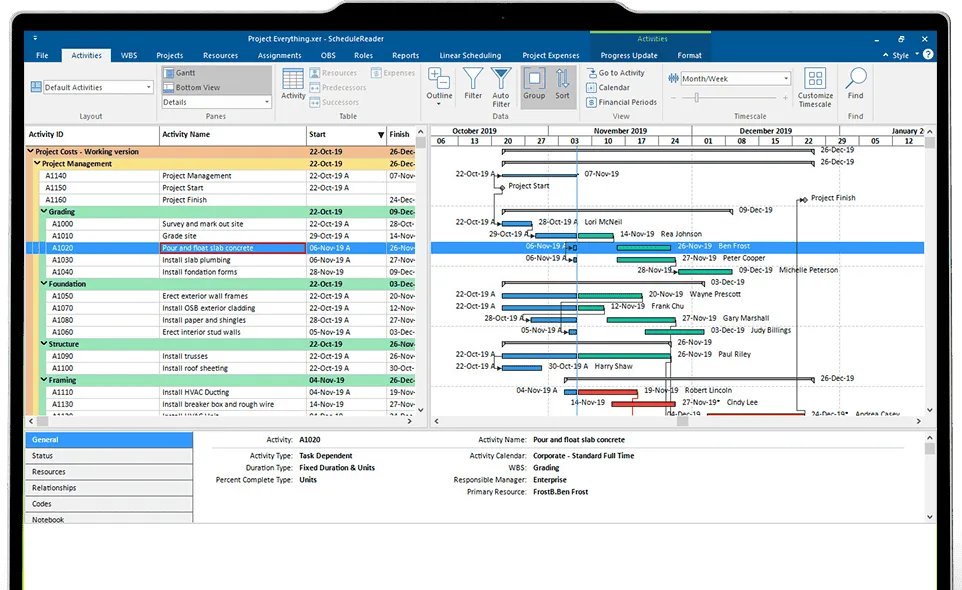
Which Primavera P6 tool is right for you?
| Your situation | Recommended tool |
|---|---|
| On-premises, a few power users, standalone scheduling | Primavera P6 Professional |
| Enterprise or matrix org, many users, global workforce | Primavera P6 EPPM |
| Cloud-first, Oracle’s forward direction, modular features | Oracle Primavera Cloud (OPC) |
| Broader team needs view-only access without P6 licenses | ScheduleReader |
Different versions of Primavera P6
As the project management landscape evolved, so has the Primavera P6 software. Today, P6 is available in several versions, including Primavera P6 Professional and Primavera P6 Enterprise Project Portfolio Management. Oracle has also introduced the Oracle Primavera Cloud (OPC) platform.
Primavera P6 Professional
Capable of organizing more than 100,000 activities associated with an even larger number of resources, Primavera P6 Professional has one of the most powerful scheduling capabilities in the market, enough to support the scheduling of the largest projects. Over the past two decades it has become the Construction and Engineering industry’s standard tool for planning and managing large-scale projects, and practitioners’ preferred choice. It is widely used for project planning and scheduling, and resource and cost management.
Primavera P6 Professional (also called P6 Client or PPM) is desktop software installed on a single Windows workstation with single licensed user access. It is known for its pricing, as one of the more costly tools on the PPM market. It also works well with other applications inside and outside the Primavera suite to meet the broader needs of project stakeholders.
Primavera P6 EPPM
As technology advanced, so did P6. A new cloud-based version arrived as the next step in the product’s evolution: Primavera P6 Enterprise Project Portfolio Management, commonly called P6 web or Primavera P6 EPPM.
Although P6 EPPM is very similar to the Client version, it differs in notable ways, from architectural background and visual appearance to new features and functionalities and different licensing options. The EPPM version includes CPM-based scheduling and project creation, resource management, integrated risk management, cost management, project portfolio and program management, unique dashboards, streamlined enterprise reporting, and several collaboration features.
This article provides a more detailed comparison between Primavera P6 Professional and Primavera P6 EPPM.
Oracle Primavera Cloud
Oracle Primavera Cloud (OPC), formerly known as Prime, is the next step in the evolution of the Primavera P6 line. OPC is a cloud-based PPM platform that provides a one-stop solution for project scheduling, portfolio planning, lean task management, resource management and more.
At its core it has powerful planning and scheduling capabilities, portfolio management and capital planning, and resource and risk management modules. It integrates the functions of P6 EPPM and P6 Professional and adds new features plus functional and visual enhancements. OPC also supports new workflows for better planning, management and control, including lean scheduling practices, built-in risk management tools, and collaborative scheduling that lets multiple users work on the same project at once. Its features are split into modules, so users can pay only for the modules they use. OPC can also output a schedule deliverable as an .xer file to share with the broader project team.
A point worth emphasizing: Oracle is actively moving on-premises P6 users toward Oracle Primavera Cloud. The company offers an automated migration path, and much of the direction of P6 development now runs through the cloud platform. If you are planning a P6 deployment or upgrade today, OPC is the platform to weigh against staying on-premises, not just an optional extra.
Tools that enhance working with Primavera P6
While the P6 versions excel at creating schedules and managing projects, additional tools such as ScheduleReader are often used alongside them to optimize communication and improve project execution efficiency.
ScheduleReader
ScheduleReader is software used to view project data from existing .xer and .xml files. It keeps the different members of the broader project team informed of project status and the individual activities of each participant, replacing PDFs and printouts for viewing project data.
Schedules load in less than 3 seconds, since the application connects to no database, and it opens .xer and .xml files created and exported from the latest versions of Primavera P6, EPPM and OPC. ScheduleReader also supports reviewing and analyzing schedule data, including baseline comparisons and earned value analysis. A side-by-side review of two schedules is easy, since multiple instances can run on a single PC.
Users interact freely with the data, filtering, grouping, sorting, and creating, customizing and sharing layouts to find the information they need. ScheduleReader also features a unique Progress Update mode, which lets users report activity and assignment status back to the scheduler. Used with Primavera P6, that workflow introduces a two-way collaborative environment across the organization.
A PRO version adds a Linear Scheduling View with time-location charts and a Calendar View, along with a DCMA 14-point schedule analysis report and reporting functionality for predefined or custom graphical reports.
On deployment, ScheduleReader installs locally on a Windows or Mac machine, or on a server for concurrent enterprise use. The latest version is available to test as part of a 15-day fully featured free trial, and additional information on licensing options is on the website.
ScheduleReader works best as an enhancement to a P6 environment, especially where organizations use P6 Professional to manage project operations. It is equally strong alongside EPPM and OPC, where it further improves the collaborative environment and makes project data available to the broader team in a cost-efficient way.
Choosing the right Primavera P6 tool for your organization or project
Many factors matter when choosing PPM software. There is no single right or wrong answer, but the following considerations can guide the decision.
On-premises or on the cloud
If you want an on-premises solution, Primavera P6 Professional is the clear choice. It suits organizations where selected team members create and maintain the schedule throughout the project, while the rest of the team accesses project data efficiently through ScheduleReader.
ScheduleReader is on-premises software that provides efficient view-only access to the project plan with features matched to the needs of the broader team, including field staff, project controllers, project managers and others, for viewing, analyzing and reporting on project data.
Primavera P6 EPPM and Oracle Primavera Cloud, by contrast, are cloud-based solutions that meet the needs of project-oriented organizations that want web access and collaboration.
Needs of users
A match between the tool’s features and the end user’s needs matters. Because of its robust CPM scheduling capabilities, standalone use, responsiveness, and speed, P6 Professional may be preferred by power users such as schedulers and planners. By contrast, the ease of access, portfolio management, and newer features of EPPM and OPC benefit schedulers and the project controls staff and managers who analyze portfolios, review reports, and coordinate costs and resources.
Size of organization
Primavera P6 Professional suits small, mid-sized, and even large companies scheduling several large projects. Its powerful scheduling engine creates intensive work schedules, and it has a well-developed ecosystem of on-premises tools that work alongside it. Companies can create schedules and share them with partner firms, which can then use a tool such as ScheduleReader to view the data or add a collaborative layer.
Medium to large organizations often manage more projects and a global workforce that needs to access and contribute to project data. There, EPPM or OPC should also be considered, because they offer advanced features for portfolio management, collaboration, analysis and reporting. As cloud solutions, they give easy access to the latest approved version of any report or schedule from anywhere in the world, which suits teams spread across locations and time zones.
Cost considerations
The Primavera P6 tools come in different versions with different licensing types and price points. P6 Professional is licensed per individual user, since it runs from a workstation. Because a license per employee becomes costly, companies often limit the number of P6 Client licenses to scheduling staff and adopt project viewers such as ScheduleReader for the broader team.
Both cloud solutions, P6 EPPM and OPC, have more flexible licensing, but access to the application workspace still falls under a license, which raises the same question of how many participants need application access.
Beyond cost, cloud versions bring a change in working method for industries with longstanding workflows that rely on offline work, such as Construction and Engineering, and Oil and Gas. That change brings challenges such as training employees on new tools, optimizing and monitoring data access, and other factors that can incur delays and costs.
In all cases, ScheduleReader is an excellent addition alongside the cloud versions, providing a cost-effective way to view, analyze and report on project data shared in the .xer format and to meet the needs of the different project participants.
Conclusion
Choosing among the Primavera P6 tools comes down to how your organization works. P6 Professional is the on-premises powerhouse for a small number of scheduling users. P6 EPPM is the enterprise, web-based answer for large or matrix organizations with many contributors. Oracle Primavera Cloud is the platform Oracle is steering customers toward, with modular features and an automated migration path from on-premises P6.
Whichever you choose, the broader project team rarely needs a full P6 license. Pairing your P6 environment with a view-only tool such as ScheduleReader keeps collaboration high and licensing cost low, and makes project data available to everyone who needs it.
Frequently asked questions
What is the difference between Primavera P6 Professional and P6 EPPM?
P6 Professional (PPM) is desktop software licensed per user, tuned for powerful standalone CPM scheduling by a small number of power users. P6 EPPM is web-based, aimed at enterprises and matrix organizations with many users who need to access and contribute to project data from anywhere.
What is Oracle Primavera Cloud?
Oracle Primavera Cloud (OPC) is Oracle’s cloud-based PPM platform, integrating the functions of P6 EPPM and P6 Professional with new features, modular licensing, lean scheduling, and collaborative scheduling. It is the platform Oracle is moving on-premises P6 users toward.
Is Oracle discontinuing Primavera P6 Professional?
Oracle continues to support on-premises P6 while actively encouraging a move to Oracle Primavera Cloud, and it provides an automated migration path. For new deployments, weigh OPC against staying on-premises.
Do all project team members need a Primavera P6 license?
No. Full P6 licenses are needed for the users who build and edit schedules. Everyone who only needs to review or analyze a schedule can use a standalone viewer such as ScheduleReader, which opens .xer and .xml files without a P6 license.
Can ScheduleReader open schedules from Oracle Primavera Cloud?
Yes. ScheduleReader opens .xer and .xml files exported from the latest versions of P6, P6 EPPM and Oracle Primavera Cloud.