Schedule Performance Index and Cost Performance Index – Project Health
The Schedule Performance Index (SPI) and the Cost Performance Index (CPI) are the two Earned Value Management (EVM) indices that tell you whether a project is running on schedule and on budget. SPI measures schedule efficiency, calculated as SPI = EV / PV. CPI measures cost efficiency, calculated as CPI = EV / AC. A value of 1.0 means performance matches the plan; a value above 1.0 is better than planned; a value below 1.0 is worse. The rest of this article explains how each index is calculated, how to read it in practice, and how to forecast with it.
| Schedule Performance Index (SPI) | Cost Performance Index (CPI) | |
|---|---|---|
| Measures | Schedule efficiency | Cost efficiency |
| Formula | SPI = EV / PV | CPI = EV / AC |
| Variance | SV = EV − PV | CV = EV − AC |
| Ideal value | 1.0 (on schedule) | 1.0 (on budget) |
| Above 1.0 | Ahead of schedule | Under budget |
| Below 1.0 | Behind schedule | Over budget |
To understand the formulas and the impacts of both indices, we must first understand a few supporting earned value terms. The Budgeted Cost of Work Scheduled (BCWS), also known as the Planned Value (PV), represents the total original and baseline budget of the project. It is the authorized budget to be used to complete the project’s work. The Budgeted Cost of Work Performed (BCWP), also known as the Earned Value (EV), represents the budgeted cost of the value of the work accomplished to date. The Actual Cost of Work Performed (ACWP), also known as the Actual Cost (AC), represents the cost incurred for work completed, normally recorded and stored in an organization’s accounting system. Where the ACWP represents the true cost of the work performed, the BCWP and the PV represent the value that should have been earned for the project’s work, per the baseline project schedule.
Every project carries predetermined business goals anchored on the Budget at Completion (BAC), the original total budget estimate established at the beginning of the project. These indices matter because they expose schedule and cost deviations from that baseline budget, or BAC, while there is still time to act on them.
Stop wrestling with Primavera XER schedules.
Your team can see your schedule without buying a P6 license.
Start Free Trial No credit card · Windows & Mac · From $344/yr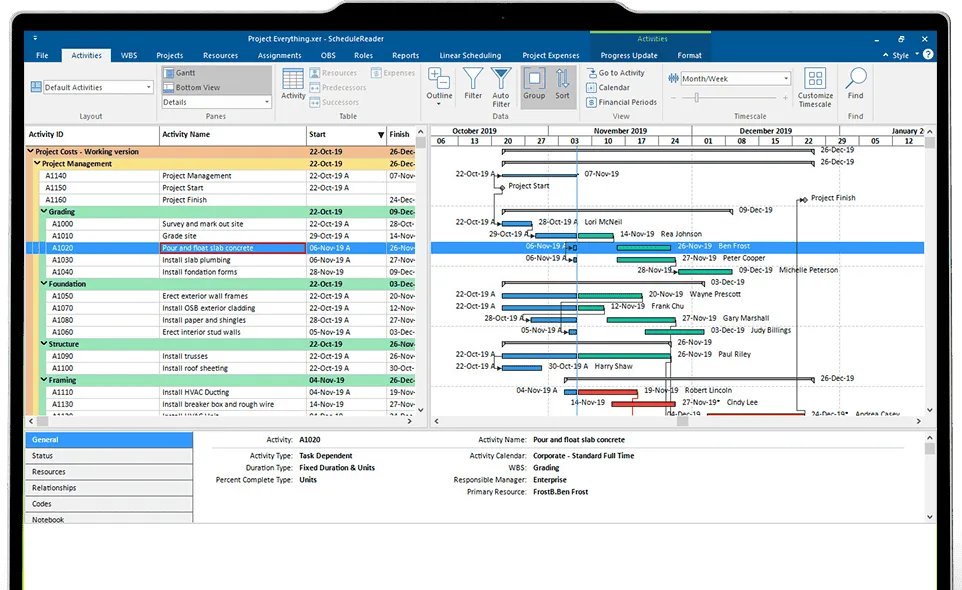
Learn how ScheduleReader can help project controls professionals.
Measuring the Schedule Performance Index (SPI)
The SPI is an efficiency ratio of the project work accomplished from a performance standpoint versus the work planned for a specific period. It indicates the rate at which the project is progressing from a schedule perspective, and it can be measured for the total project effort, at a WBS level, or even at the level of a task or set of tasks. The SPI formula yields a numerical value in decimal format.
The formula for SPI is structured as such:
SPI = Earned Value / Planned Value
or
SPI = BCWP / BCWS
A Schedule Variance (SV) measures the project’s schedule efficiency in parallel. This is the delta between the work planned and the work performed, or EV minus PV. The result is represented as a numerical value, most often currency.
SV = EV − PV
To begin, open the project menu in Primavera P6, where you may want to show the specific columns that are indicative of the indices you want to track:

In our EVM exercises, we use financial data from the top and overall level of our project schedule. Our Primavera P6 schedule shows the following dollar values from the manufacturing project schedule:
- SPI = 0.91
- Schedule Variance = $(37,846.07)
- Cost Variance = $(32,817.07)
- CPI = 0.92
- Earned Value Cost (EV or BCWP) = $403,673.55
- Planned Value Cost (PV or BCWS) = $441,519.62
- Actual Total Cost (AC or ACWP) = $436,490.62

Using our SPI formula, we divide $403,673.55 by $441,519.62. We get 0.9142822463925839, and we round the figure to 0.91. The resulting SPI indicates that we are behind schedule according to the baseline. To understand this value in dollars, we use our SV formula to subtract $441,519.62 from 403,673.55,whichresultsinanegativedollarvalueof(37,846.07). The current project schedule indicates that we have not accomplished enough schedule performance against our original PV as of the current project status date.
Measuring the Cost Performance Index (CPI)
The CPI formula is structured as such:
CPI = Earned Value / Actual Cost
or
CPI = BCWP / ACWP
A Cost Variance (CV) measures the project’s cost efficiency in parallel. This is the delta between the cost budgeted and the cost spent, or EV minus AC. The result is represented as a numerical value, most often currency.
CV = EV − AC

Using our CPI formula, we divide $403,673.55 by $436,490.62. We get 0.9248160934134163, and we round the figure to 0.92. The resulting CPI indicates that we are overrunning our budget according to the baseline cost. To understand this value in dollars, we use our CV formula to subtract $436,490.62 from $403,673.55, which results in a negative dollar value of (32,817.07). This figure indicates that we are currently over budget by \32,817.07, based on our baseline cost contained in the project schedule.
Reading SPI and CPI correctly
A raw index number tells you less than it first appears. Two conditions affect how you should read these figures.
The first is cumulative versus periodic reporting. An SPI or CPI calculated from cumulative values since the project began smooths out recent performance. A periodic index, measured over a single reporting period, reacts faster to a change and is often the better early-warning signal. Sufficient practice is to track both.
The second is the known weakness of SPI late in a project. Because SPI is built on cost, it converges toward 1.0 as the project nears completion, even on a project that has run consistently behind schedule, since once all activities finish the earned value equals the planned value. A value of 1.0 near the end therefore does not mean the project recovered its lost time. This limitation is one reason organizations adopt Earned Schedule (ES) and its time-based index, SPI(t), which compares earned schedule to actual time rather than earned value to planned value, and which avoids the false convergence of the classic SPI. SPI(t) is defined as Earned Schedule divided by Actual Time, and an SPI(t) below 1.0 indicates that the project is behind schedule.
A related caution applies to values above 1.0. An SPI above 1.0 is usually read as “ahead of schedule,” but the metric can rise simply because more work was completed than planned in a period, not because the work on the critical path is progressing. Read SPI against the critical path and the schedule quality before treating an above-1.0 value as good news.
Forecasting with CPI and SPI
These indices are most useful when you convert them into forward-looking estimates. Their value as an early-warning system depends on using them before deviations compound.
The Estimate at Completion (EAC) projects the total cost of the project from the cost performance to date. Where current cost performance is expected to continue, the simplest form is:
EAC = BAC / CPI
The Estimate to Complete (ETC) gives the remaining cost, generally EAC minus AC.
The To-Complete Performance Index (TCPI) answers the recovery question: what cost efficiency the remaining work must achieve to reach a target. To finish on the original budget:
TCPI = (BAC − EV) / (BAC − AC)
Where the original budget is no longer realistic, the same formula runs against a revised EAC in place of BAC. A TCPI that climbs further above 1.0 indicates a recovery that is becoming harder to achieve.
For schedule forecasting, the parallel time-based measures are EAC(t) and TCPI(t) using Earned Schedule, which express the remaining time and the required pace rather than cost.
Utilizing ScheduleReader and the Schedule and Cost Performance Indices
ScheduleReader serves as an interface to view activities and generate progress from tools such as Primavera P6. ScheduleReader is Windows-friendly and supports Excel and XML file types. It offers an inexpensive licensing alternative to Primavera P6 for large teams that do not have full access to Primavera P6, so they can view schedule progress and stay current with the project team’s progress.
Team members without a Primavera P6 license can easily open and view schedules in the Primavera P6 XER format. This section of the article documents how a ScheduleReader user can import and view a Primavera P6 XER schedule in the ScheduleReader software, as well as utilize the columns for maximum effect.
Importing the Primavera P6 XER schedule and baseline into ScheduleReader
Launch ScheduleReader and select the File tab to open the location to retrieve the XER file that has been exported from Primavera P6. The initial view in the Activities tab offers several possibilities to view the schedule data:

You must select the File tab again to import the Primavera P6 baseline associated with the XER. After selecting the File tab, select “Baselines” and designate the appropriate Primavera P6 XER file associated with the project’s baseline under the “Project Baseline” section:
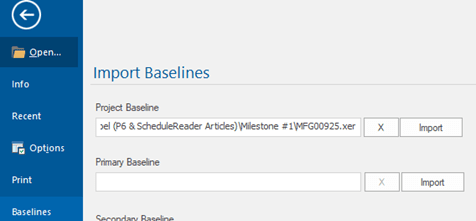
If the Primavera P6 schedule also contains a secondary or tertiary baseline, you can also assign these in the “Import Baselines” section by selecting and importing the same Primavera P6 XER file.
Customizing columns in ScheduleReader
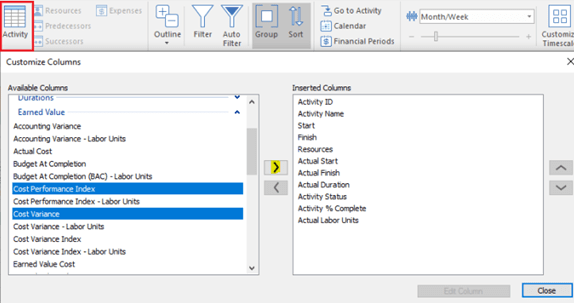
ScheduleReader’s Activity feature closely resembles Primavera P6’s customizable columns setup. Select the Activity icon and use the Available Columns on the left side to choose your column selections. The arrows can be used to move the editable columns into the Inserted Columns box on the right side.
In this example and for this exercise, we use selections under Earned Value to select the CPI, CV, SPI, SV, EV cost, PV cost, and AC. We can use the arrows on the right side to move the contents of the Inserted Columns box into a particular order:
Efficiencies for team collaboration using ScheduleReader
As stated before, EVM indices such as the Schedule Performance Index and the Cost Performance Index can help the project manager and the project team stay on top of their projects. Using ScheduleReader offers users additional convenient features for team collaboration, such as its customizable layouts that can be viewed easily from an imported Primavera P6 XER file, whether the user has access to Primavera P6 or not. This function allows cross-team collaboration while keeping all members of the project team up to date on the most current project schedules.
Frequently asked questions
What does an SPI below 1 mean?
An SPI below 1.0 means the project is behind schedule: the earned value is below the planned value for the period.
What does a CPI of 0.92 mean?
A CPI of 0.92 means the project is earning $0.92 of value for every $1.00 spent, so it is running over budget.
Is CPI or SPI more important?
Neither is complete on its own. CPI governs cost and SPI governs schedule, and a project can be on schedule and over budget at the same time, or the reverse. Read them together with their variances.
Does SPI always mean what it says?
No. The classic SPI converges toward 1.0 as a project nears completion even when it has run late, which is why the time-based Earned Schedule and SPI(t) exist. An SPI above 1.0 can also reflect volume rather than progress on the critical path.