

XER File Viewer for Primavera P6 Schedules
DCMA 14-point assessment, baseline comparison, trace logic, risk view and reports - then try it on your own .xer file.
Free trial
Open Your Own .xer File
15 days, every PRO feature, no card. Send the request and a specialist replies with the download link.
- Works with .xer and P6 XML exports
- Windows, macOS or the browser
- Nothing is written back to Primavera P6
I was tired of saying there was no easy way to open and view an XER file without P6. Reviewing a giant schedule is now done in seconds.
The Schedule, as the Planner Built It
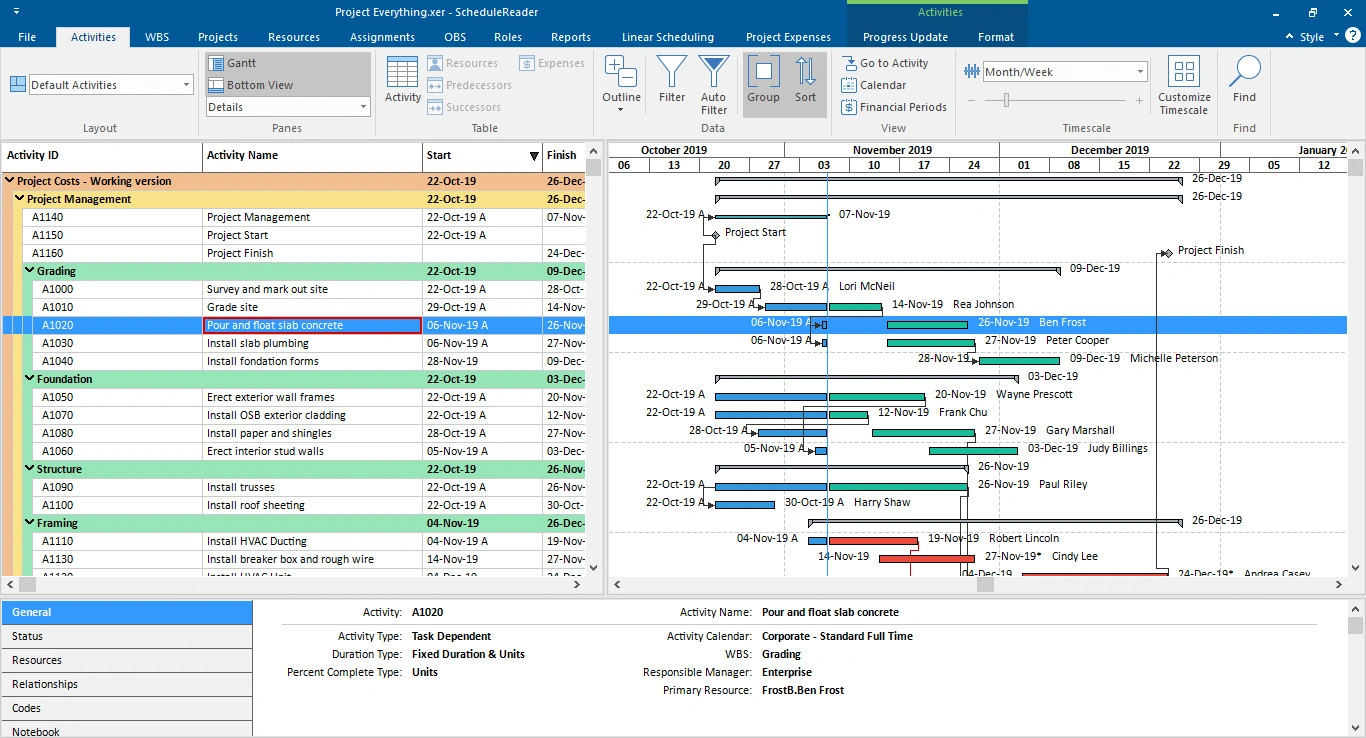
Activities, WBS, resources and roles in one window, with the Gantt and the critical path where you expect them. Opened read-only, straight from the .xer file.
- Trace logic between activities and successors
- Baselines and up to four versions compared
- Nothing written back to Primavera P6
What you can do
Explore Rich Features and Functionalities
Each one is built to help teams read, understand and communicate a P6 schedule - without changing the original plan.
View Project Data
Activities, WBS, resources, roles and projects in a Gantt chart or a table, read straight from the file.
Interactive overviewTrack Project Progress
Site teams propose updates and schedulers import them back into P6, without a P6 seat for every viewer.
Progress updateCollaborate
Share a read-only view of the schedule without handing over the .xer file or risking the original.
Read-only accessGenerate Reports
Dynamic reports and dashboards for stakeholders - not another PDF export nobody opens.
Reports and dashboardsCustomize Views
Personal layouts, filters, groups and timescales, saved per project and per person.
All featuresCompare Projects
Put two schedules with the same Project ID side by side, or audit one against the DCMA 14 points.
Compare projectsFree XER viewer vs ScheduleReader
Both Open the File. What You Can Do Afterwards Is the Difference
| Capability | A free XER viewer | ScheduleReader |
|---|---|---|
| Open and render an .xer file | Yes | Yes - desktop (Windows, macOS) or browser |
| DCMA 14-point check | Partly - a score for the file in front of you | Yes - all 14 metrics, saved as a report (PRO) |
| Compare a baseline or last month's version | No - one file at a time | Yes - baseline comparison and project-to-project (PRO) |
| Share a read-only view without handing over the file | No - you send the .xer | Yes - read-only access, original untouched |
How it helps
How ScheduleReader Helps You
This companion software to Primavera P6 is a versatile XER viewer that helps project teams communicate their schedules.
Greater Project Control
Ensure projects are finished on time, within budget and without delays caused by miscommunication.
Save Time and Resources
Share project schedules as XER or XML without formatting and exporting plans to PDF.
Be Constantly up to Date
Receive field updates while maintaining full control over the original project schedule files.
Dynamic Overview
Move on from the static view of PDF files and read project information in a more sophisticated, dynamic way.
Simple Organization and Customization
Personal views with custom filters and groups, set up for your project specifics.
Easy Working
A simple way of proposing and reporting on new activities and progress updates.
Testimonials
What Our Customers Say
P6 instructors, resellers and project controls teams on why the schedule stopped being a PDF.
Case studies
How Teams Use ScheduleReader
Seymour Whyte, contractors and project controls teams describe the problem, the solution and the results.
- Seymour Whyte - infrastructure
Complex civil construction projects that needed a better way to review updates, compare schedule versions and collaborate around project information.
- Ovivo - program milestone tracking
Reviewing a programme to track contractual milestones, planned completion milestones and contingency, and to find where issues lie when changes are made.
- OMV - schedule integrity review
One button runs the DCMA 14-point assessment, which decides whether a schedule is worth a detailed review at all.
- PCPM - construction schedule analysis
Reviewing over a dozen projects monthly, ranging from $8M to over $200M in construction cost, most of them new build hospitals.
FAQ
Frequently Asked Questions
What Is ScheduleReader?
ScheduleReader (formerly PrimaveraReader) is a versatile XER viewer that helps companies communicate their Primavera P6 project schedules. It is a companion tool to Primavera P6 that improves the efficiency of project teams.
Which Formats Does It Open?
It opens .xer and P6 XML schedules exported from Primavera P6, of all sizes, and shows the plan in dynamic, interactive views.
Do I Need an Oracle Primavera P6 License?
No. ScheduleReader gives read-only access to schedule data, so project teams can view, share, analyze and report without an Oracle Primavera P6 license.
Who Is It Aimed At?
Team members and project participants who currently view the schedule in PDF, plus project controls, planners, schedulers, managers, foremen and team leads.
How Much Does It Cost?
Standard is $344 per user per year and PRO is $440, both including a 1-year SMA. The 15-day trial is free and includes every PRO feature, so you can open your own schedule before deciding.
Where Does My .xer File Go?
Nowhere on the desktop app: ScheduleReader reads the file on your machine, never uploads it, and never writes back to it. In ScheduleReader Online the file travels encrypted, is stored encrypted in your account and can be deleted at any time.
Is It for a Single Project or a Whole Company?
Both. It is used for one-off projects or rolled out to an enterprise, helping teams work with existing Primavera P6 schedules of all sizes.
Get started
View, Share and Analyze P6 Schedules Without the License
15-day trial with every PRO feature and no card. Licences from $344 per user per year. Read-only - nothing is written back to Primavera P6.