Filter
Viewing the updating activities and their parameters can be a very tricky process when the project contains several thousand activities. That is the main reason for implementing the filtering option. Selecting the “Filter” feature from the ribbon will show only those activities whose parameters have been modified.
Highlight
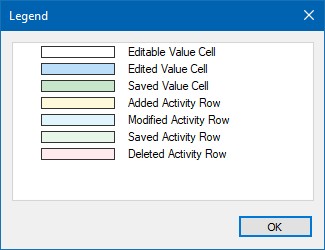
Highlighting functionality gives visual information of the updated activities. Each activity row in the table, depending on the undertaken action, is colored with different colors. See the “Legend” section for a detailed overview of the colors used in the updating process.
Legend
The legend dialog implemented in the Progress Update ribbon gives an explanation for the meaning of the row colors that are used in the activity table during the updating process. The colors that are used in the Progress Update mode are presented in the image below.